AI beverage counter for bars & restaurants
You Can't Watch Every Pour. Your AI Can.
Turn a laptop or phone you already own into an AI beverage counter. No AI servers. Nothing to install. Open your browser, point the camera at the bar, and start counting.
Plans from $29/month, or half price paid yearly.
- Runs in your browser
- Uses hardware you own
- Cancel any time
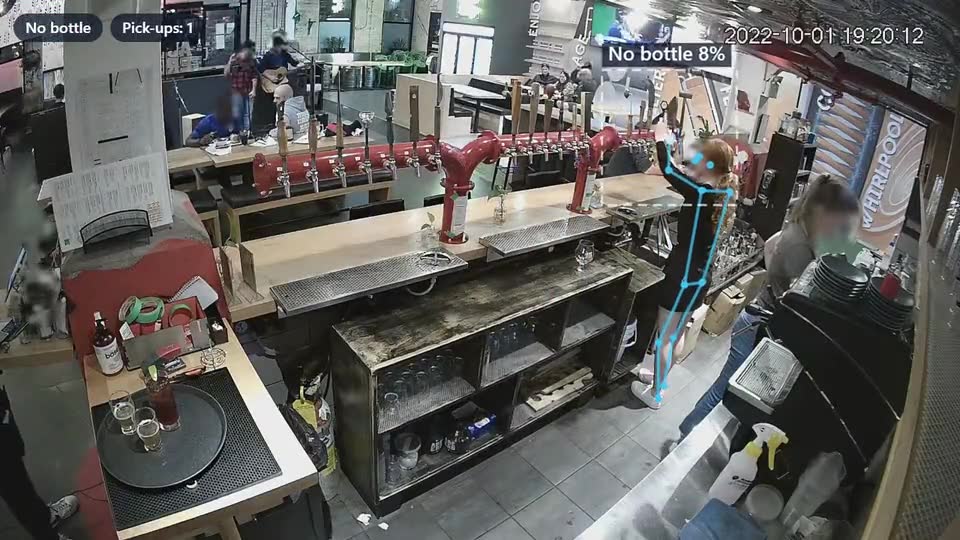
Your Bar Keeps Running. Do You Know What's Being Poured?
You can't watch every drink, every shift, or every bartender. But a camera can.
Are drinks being poured without a matching sale?
When in the shift is your bar busiest?
How much is poured on the shifts you don't work?
Are you ordering stock on guesswork?
Stop guessing. Start measuring what happens behind your bar.
Set up in minutes
From the Device You Own to an AI Pour Counter
Three steps. No servers, no wiring, no technician.
Open BevCounter
Sign in at manage.bevcounter.com on a laptop or phone. No app store, no installer, no IT visit.
Point the camera
Stand or mount the device where it can see the beer taps, cocktail well or back bar, and plug it into power.
Start counting
Choose the camera and press start. Every pick-up and pour is counted with a timestamp, ready to check against your till or export as CSV.
All you need
Already have bar camera footage? Open a recorded video instead of a live camera.
Demo
Don't Take Our Word for It. Watch AI Count Drinks.
BevCounter follows the bartender's hands, checks what they're holding, and logs each pick-up and pour.
Sample count log
Export CSV| Time | Event | Camera |
|---|---|---|
| 21:04:12 | Pick-up | Back bar |
| 21:04:31 | Pour | Back bar |
| 21:06:02 | Pick-up | Back bar |
| 21:06:19 | Pour | Back bar |
| 21:09:47 | Pick-up | Back bar |
Example of the log format, not real venue data.
Demo results are illustrative. Accuracy depends on camera position, lighting and device. Pour counting is in beta.
Pricing
Affordable AI for Every Bar
Start with one station. Pay monthly, or save 50% paying yearly.
SilverMost popular
$69/month
or $34.50/month paid yearly
Ideal for: Growing venues
5,000 NFT credits a month
Get SilverGold
$99/month
or $49.50/month paid yearly
Ideal for: Busy, high-volume bars
15,000 NFT credits a month
Get GoldWhy BevCounter
Enterprise-Style AI Without Enterprise-Style Complexity
Smarter software. Less infrastructure. More accessible AI.
Built for independent bars
No IT department needed. Neighbourhood pubs, sports bars, cocktail lounges and small restaurants set it up themselves.
Edge AI on your device
The AI runs in the browser on your own device, so there are no cloud video servers to pay for. That keeps the price low, and your video never leaves the bar.
Start with one station
Point one camera at your busiest station first. Covering the taps and the well? Run BevCounter on a device at each.
Private by default
Faces are blurred on screen, and counts stay on the device you counted on until you export them.
FAQ
Questions Bar Owners Ask
Do I need to buy an expensive camera system?
No. A laptop, phone or tablet with a camera and a stand is enough. You can also open video recorded by a bar camera you already have.
Do I need to install software?
No. BevCounter runs in your web browser at manage.bevcounter.com. There's nothing to download.
How long does setup take?
Sign in, put the device where it can see the station, plug it in and press start. Most of the time goes into finding a good camera angle.
Can I cover more than one station?
Yes. Each device counts the station it can see, so run BevCounter on a device at each station. Each device keeps its own count log for now.
Can I check my bar when I'm not there?
Not live yet. Leave BevCounter running through a shift, then review the timestamped counts on that device, or export them as a CSV, when you're back.
Is my video uploaded?
No. The AI runs on your device inside the browser, so video stays at the bar. Faces are blurred on screen.
Does BevCounter prove employee theft?
No. It shows beverage activity and possible gaps for you to look into. A difference in counts alone doesn't prove anyone did anything wrong.
Can I cancel?
Yes, any time, from the Plan card in the console. Your plan runs to the end of the period you've paid for. To change plans, get in touch.
Your Bar Is Pouring Drinks Right Now.
Do You Know How Many?
Start with the device you have. Start with one station. Start today.
Plans from $29/month.
BevCounter AI. Every pour counts. Every dollar matters.